At a Glance#
A resume that almost fits is its own kind of annoying. You write two solid pages and three stray lines push onto a third, or you trim too hard and the second page sits half empty. Either way you end up hand-tuning font sizes and margins, recompiling, and eyeballing the result over and over.
resume-tex-fit turns that fiddling into one search. The document exposes a single scaling command, and every font size, line height, and gap is computed from it. The tool edits that one number, compiles with xelatex, reads the page count from the log, and searches for the largest scale that still fits the target. Locking the largest scale means the last page fills as much as it can without spilling.
It runs from the terminal for scripting, or opens a small tkinter window with a file picker if you would rather click. The core fit uses only the Python standard library, so past a working LaTeX distribution there is nothing to install.
The Problem#
The usual ways to force a page count all have a catch. Nudging one font size shifts everything downstream, so you chase the overflow around the document. Scaling the whole thing down to hit a count often lands on a size that is too small to read or that an applicant tracking system mishandles. Padding a short page with inflated type reads as exactly what it is. And however you got it to fit this time, you redo the whole thing the next time you edit a bullet.
The common thread is that every fix is manual and none of it is repeatable.
Why LaTeX for a Resume#
If you have only used Word or Google Docs, the short version is this. LaTeX is a typesetting system: instead of formatting by clicking buttons, you mark what each piece of text is (a heading, a job title, a bullet) and let the system handle the spacing, alignment, and line breaks. It keeps that consistent across the whole document, so an edit in one place does not quietly break the layout somewhere else.
Two things matter specifically for a resume. Your resume becomes one small plain-text file you can back up, compare against an old version line by line, and rebuild into the exact same PDF a year from now, instead of a folder of near-identical resume_final_v3.docx copies. And when it is built right, it reads cleanly to applicant tracking systems, because the words are real selectable text rather than baked into a picture the way many design-tool exports are.
The honest tradeoff against the usual options:
| Tool | Good At | The Catch for a Resume |
|---|---|---|
| Microsoft Word, Google Docs, Apple Pages | Fast to start, universal, edit the page as you see it | • Layout drifts as you edit, and one added bullet reflows the page • Holding an exact page count is manual and breaks on the next edit • Spacing and alignment wander across saved versions |
| Canva, Adobe InDesign, Figma | Polished, designed visuals with little effort | • Exports usually flatten the text into an image or a heavy PDF that ATS parsers cannot read • Multi-column layouts get scrambled by parsers that read straight across • No plain-text source to version or diff |
| Zety, Novoresume, Resume.io, Kickresume | Guided templates and a quick first draft | • You are locked into the builder, with constrained export and formatting • The finished download is often paywalled • Little control over exact spacing or page fit |
| LaTeX, via Overleaf or local xelatex | Consistent typesetting, precise control, reusable plain-text source | • A steeper start, and you edit markup instead of a live page • This tool plus an AI conversion removes most of that cost |
The steeper start is the real cost. It is why this tool hands the writing of the LaTeX to an AI, covered a couple of sections down, so you mostly skip it.
What a Run Looks Like#
The repo ships a deliberately overloaded demo.tex that runs onto a second page at normal size. Target one page:
python3 resume-tex-fit.py demo.tex --pages 1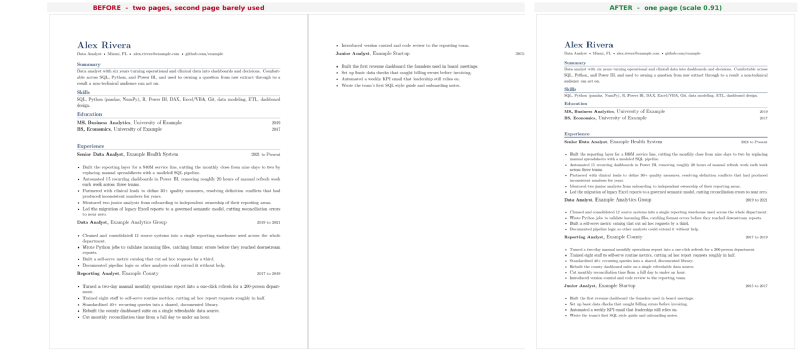
It searches the density and locks the largest scale that still holds one page:
Fitting demo.tex to 1 page(s) (scale range 0.90-1.05):
  scale 1.0000 -> 2 page(s)
  scale 0.9000 -> 1 page(s)
  scale 0.9500 -> 2 page(s)
  scale 0.9250 -> 2 page(s)
  scale 0.9125 -> 2 page(s)
  scale 0.9062 -> 1 page(s)
  scale 0.9094 -> 1 page(s)
  scale 0.9064 -> 1 page(s)

Locked scale 0.9064 -> 1 page(s). Backup saved as demo.tex.bak.
The only edit it makes to your file is one number, the scaling knob. Every size, line height, and gap recomputes from that value, so the whole document tightens by the same proportion instead of one part getting cramped. The original is saved as demo.tex.bak next to it.
Bring Your Own Resume#
You do not have to learn LaTeX or write any of the machinery by hand. A general model converts an existing resume reliably, but only if you hand it the scaling machinery and tell it to route every size through the knob. A plain “convert my resume to LaTeX” request produces hardcoded sizes the tool cannot touch, so the fit has nothing to turn.
The prompt below handles three inputs. Paste the plain text of your resume and it builds a clean layout. Attach your current resume as a PDF or DOCX and it reproduces the look as closely as it can. Or hand it an existing template plus your content and it rewires the template through the knob while keeping its look. It forces every size through the knob, keeps the output single column and ATS-safe, and is told not to invent content.
Proofreading the result is on you, because this is a resume. AI conversion drops bullets, mangles special characters like percent signs and ampersands, and occasionally invents a detail, so read every line against your original and check for % TODO markers where the model was unsure.
You can shape the look in the same request. Ask for a specific font, one accent color, tighter or looser spacing, or wider margins in plain words, and the model applies it while keeping every size routed through the knob so the fit still works. Keep it single column, since many applicant tracking systems read straight across the page and jumble two-column text.
The full conversion prompt
Paste this into your AI of choice, fill the bracketed fields, and mark your input A, B, or C at the bottom.
You are producing ONE self-contained LaTeX file that compiles with xelatex. It will be fed to a tool called resume-tex-fit, which fits the document to a target page count by turning a single scaling knob, so every font size, line spacing, and vertical space MUST be computed from that knob. Follow every rule exactly. Do not deviate, and do not explain your work.

INPUT MODE. I am giving you exactly one of the following, and I mark which at the very bottom:

  (A) The plain text of my resume, pasted below.
      Build a clean, single-column layout from scratch, using the font and accent color from rule 7.

  (B) My existing resume as an attached file (PDF or DOCX).
      Read it, extract its content exactly, then reproduce its appearance (fonts, colors, section styling, sizes, spacing) in LaTeX as closely as you can. Match what it looks like; do not redesign it. Flatten it to a single column even if the original has columns (rule 6). Change no wording, add nothing, drop nothing.

  (C) An existing .tex file (a template or my own draft), followed by my resume content.
      Keep the file's visual design and only swap its sample content for mine. Do not redesign it. If it relies on a custom class or style file (a .cls or .sty that is not a standard package), inline the parts you need into this one file, because the tool edits only this single .tex and cannot reach sizing locked inside a class.

Rules 1 to 8 apply to ALL modes.

1. Knob machinery. Include this verbatim in the preamble and route ALL sizing through it. Leave no font size, leading, or vertical space anywhere that bypasses \rs, including sizes carried over from a file or template.

   \usepackage{xfp}
   \newcommand{\rs}{1.000}
   \newcommand{\fs}[2]{\fontsize{\fpeval{#1*\rs}}{\fpeval{#2*\rs}}\selectfont}
   \newcommand{\sv}[1]{\vspace{\fpeval{#1*\rs}pt}}

   Use \fs{size}{leading} for every size, \sv{pt} for every manual vertical space, and \fpeval{VALUE*\rs} inside any package option or length that takes a measurement (\titlespacing, list itemsep and topsep, \setlength, \\[...] line-break spacing, and so on). When you carry a size over from a file or template, keep the same number so the look is identical at \rs = 1.000. Leave \rs at exactly 1.000; the tool sets it, not you. Never hand-tune sizes to hit a page count.

   BANNED, because each sets a fixed size the knob cannot move: a bare \fontsize outside the \fs macro; the named size commands \tiny \scriptsize \footnotesize \small \normalsize \large \Large \LARGE \huge \Huge; a raw \vspace, \vskip, \hspace, or \\[Npt] with a literal measurement; and any literal pt, em, or cm value in a package option or length. Replace every one with \fs, \sv, or \fpeval{VALUE*\rs}.

2. Content integrity. Use only the content I provide or that appears in the file I attach. Do not invent employers, titles, dates, metrics, or achievements, and drop any sample or placeholder content. If something is unreadable, ambiguous, or missing, leave a % TODO comment instead of guessing.

3. Compiles with xelatex. The file must build with a plain: xelatex file.tex . If a template or reproduction would need a pdflatex-only setup (for example \usepackage[T1]{fontenc} with a Type 1 font package), replace it with a fontspec equivalent or the default Latin Modern.

4. Self-contained. One file only. Do not \input or \include external files, and do not depend on a separate .cls or .sty beyond standard packages. Inline anything you need.

5. Escaping. Escape LaTeX specials in any text taken from plain input or a file: & % $ # _ { } ~ ^ and backslash. Keep real dollar amounts as \$ (for example, \$540M). Do not double-escape content that is already valid LaTeX in a template.

6. ATS-safe. Single column, real selectable text, standard section headings via \section, no text rendered as an image, no content laid out in tables. Standard section names (Summary, Experience, Education, Skills, Projects) help both parsers and the tool's checks. This holds even when reproducing a multi-column original: keep the styling, drop the columns.

7. Look. Mode A: set the main font with fontspec to [FONT NAME, or "the default" to use Latin Modern with no extra files], and use one accent color [ACCENT HEX, for example 1A365D] for the name, headings, and rules. Mode B: match the file's fonts and colors; if you cannot identify a font, use the closest common one and note the substitution in a % comment. Mode C: keep the template's fonts and colors unless I override here: [OPTIONAL overrides, or leave blank].

8. Target. Aim the layout at roughly [TARGET PAGES] page(s) at normal size, but do not force it; resume-tex-fit will tighten or relax the fit.

If a rule is impossible for a given input, do not break it silently: put one % NOTE line at the very top of the file saying what you could not do, then follow every other rule.

Before you output, check each of these: \rs is exactly 1.000; every size and gap goes through \fs, \sv, or \fpeval; none of the banned commands above appear; the layout is single column; and the file would compile with xelatex. Fix anything that fails before you send it.

Output ONLY the complete .tex file in one code block, beginning with \documentclass and ending with \end{document}. No prose, label, or note before or after it.

Here is my input (marked A, B, or C):
[FOR A: PASTE RESUME TEXT. FOR B: ATTACH THE FILE AND WRITE "B" HERE. FOR C: PASTE YOUR .tex THEN YOUR RESUME CONTENT.]
Save the result as myresume.tex next to the script and run the fit against it. The template shortlist and the full styling menu are in the repo.
Two Ways to Run It#
The tool works on the .tex in place. It writes the chosen scale into the knob and saves a .tex.bak next to it first, so your original is recoverable. The fitted PDF is separate: your source file stays put, and you decide where the PDF lands.
From the terminal, point it at a file and a page target:
python3 resume-tex-fit.py myresume.tex --pages 2
python3 resume-tex-fit.py myresume.tex --pages 1 --out ~/Desktop/resume.pdf
python3 resume-tex-fit.py cv.tex --pages 0
--pages sets the target, --out copies the fitted PDF to a path you name, and --force reaches the target even when the content does not fit, with a warning about the cost. A target of 0 fits to the document’s natural length, which is what you want for a CV that should run as long as it needs to.
The GUI covers the same ground behind a file picker. Pick a .tex, choose a document type (Junior for one page, Senior or Executive for two, Academic CV for its natural length) or type a raw page count, and hit Fit. It asks where to save the PDF before it runs, then writes it there once the fit succeeds. xelatex runs on a background thread, so the window stays responsive while it works.
The One Knob#
Here is the machinery the prompt wires for you, in case you want to write or tweak it by hand. The tool does not parse your layout or resize elements one by one. It turns a single density knob, \rs, and recompiles. Each size is written as a base number times \rs, so \rs at 1.000 gives the normal sizes, 0.95 shrinks everything 5%, and 1.03 grows it 3%. That one value scales the whole document, and it is the only thing the tool changes.
Wiring it up is a few lines in the preamble. You need xfp for the arithmetic, the knob itself, and two small helpers so the rest of the document never writes a raw size:
\usepackage{xfp}                         % \fpeval for inline arithmetic

% The one knob resume-tex-fit turns. Keep it at 1.000 in source; the tool sets it.
\newcommand{\rs}{1.000}

% \fs{size}{leading} selects a font size and line spacing, both scaled by \rs.
\newcommand{\fs}[2]{\fontsize{\fpeval{#1*\rs}}{\fpeval{#2*\rs}}\selectfont}

% \sv{pt} inserts vertical space scaled by \rs.
\newcommand{\sv}[1]{\vspace{\fpeval{#1*\rs}pt}}
From there body text uses \fs{10}{11.7}, a section gap uses \sv{6}, and every size traces back to \rs. The knob is a hard dependency by design: if the .tex does not route its sizing through \rs, there is nothing to turn and the tool refuses to run.
The Search#
From a target page count to a locked scale, the tool runs a fixed sequence. It checks feasibility against the document’s natural size, not against the scale ceiling, so a longer target does not pad a short resume unless you turn on Force Fit.
flowchart TD
    A[Read target page count] --> B{Does the .tex route sizing through the rs knob?}
    B -- no --> X[Refuse and exit]
    B -- yes --> C[Compile at natural size to check feasibility]
    C --> D{Does the target fit the normal scale range?}
    D -- too long --> E[Report overflow and cut guidance, then restore]
    D -- too short --> F[Report the page count reached and decline to pad]
    D -- feasible --> G[Binary-search for the largest scale that still fits]
    G --> H[Back off the boundary slightly so a reflow cannot spill]
    H --> I[Write the knob, save .tex.bak, report the locked scale]
The Three Outcomes#
The tool reports honestly when a target is not reachable instead of shrinking the type into unreadability.
Fits. It searches the range, backs off the boundary, locks that scale, and reports it. A .tex.bak is saved first so you can revert.
Too long. If the document still overflows at the smallest normal density, it estimates the overflow (in lines, if pdfplumber is installed) and gives options ordered easiest to hardest, ending with Force Fit. Left alone it restores your file and changes nothing.
Too short. If the content does not reach the target at normal size, it reports what it fills and declines to pad. Force Fit will grow the type to hit the count anyway, which reads as padding, and the tool says so.
Force Fit is the opt-in escape hatch for the first two. It grows past the normal ceiling or shrinks below the readable floor to hit the target, with a plain warning about the cost.
Walking Through the Fit#
Reading the Page Count#
Every step of the search reduces to one question: at this scale, how many pages does the document compile to? The tool answers it by running xelatex once and reading the answer straight out of the LaTeX log, which prints the final page count on the line that reports the output file.
PAGES_RE = re.compile(r"Output written on .*?\((\d+)\s+pages?\)")

def compile_pdf(tex, log):
    """Compile once; return the page count. Raise FitError on failure."""
    proc = subprocess.run(
        ["xelatex", "-interaction=nonstopmode", "-halt-on-error", tex.name],
        cwd=tex.parent, stdout=subprocess.DEVNULL, stderr=subprocess.DEVNULL,
        timeout=COMPILE_TIMEOUT,
    )
    # ... on failure, surface the first LaTeX error line so the user
    #     does not have to open the log to see what broke ...
    matches = PAGES_RE.findall(logf.read_text(encoding="utf-8", errors="ignore"))
    return int(matches[-1])
-halt-on-error stops the compile at the first real error instead of letting it limp along, and -interaction=nonstopmode keeps xelatex from waiting on a keystroke that a background run would never send. Reading the count from the log rather than opening the PDF means the fit never needs a PDF library for its core loop.
The Binary Search#
Feasibility is judged against the document at neutral density, not against the scale range. Compiling once at \rs = 1.000 gives the natural page count, and every branch (fits, too long, too short) keys off that number.
# Judge feasibility against the natural size at neutral density, not the
# ceiling, so a larger target never pads the doc by inflating type.
p0 = page_count(1.0)
Once the target is feasible, the search itself is a plain bisection over the scale. Page count falls as the scale shrinks, so the tool narrows the interval toward the largest scale that still holds the target, keeping the best passing scale as it goes.
best = lo
for _ in range(MAX_ITERS):
    if hi - lo < TOLERANCE:
        break
    mid = (lo + hi) / 2.0
    if page_count(mid) <= target:
        best, lo = mid, mid
    else:
        hi = mid
The loop caps at MAX_ITERS and also stops once the interval closes below TOLERANCE, so it terminates even on a document where the page boundary never lands exactly on a tested scale. The assumption underneath is that page count rises with scale, which holds almost always. LaTeX reflow can occasionally shuffle a widow or float across a boundary and break it, in which case a fit can come out a page off until a small edit and rerun settles it.
Backing Off the Boundary#
Locking the exact boundary scale would leave no slack, so a later edit that reflows one line could push the document over. After the search, the tool steps back a hair from the boundary, spending a little density to buy that margin. The one case it skips is a forced grow, where the best scale already sits at the top of the target window and backing off would drop below target and trip a false “too sparse”.
# Back off the boundary so a reflow can't spill into an extra page. Skip
# it when growing: there best sits at the top of the target-page window,
# and backing off could drop below target and trip a false "too sparse".
if not grew:
    best = max(floor, best - SAFETY)
final = render(best)
SAFETY is a small fixed step, and floor clamps the backoff so it never pushes below the legibility floor the run is working within.
Under The Hood#
Three implementation pieces worth a closer look.
Refusing a file that has no knob
The knob is the tool’s only hook into the document, so the first thing it does is confirm the knob exists. A single regex looks for \newcommand{\rs}{...} in the source, tolerant of whitespace, and a second pass counts standard resume sections to guess whether the file is a resume at all.
KNOB_RE = re.compile(r"(\\newcommand\s*\{\s*\\rs\s*\}\s*\{)\s*([0-9.]+)\s*(\})")

def check_tex(path):
    """Inspect a .tex without compiling. Returns a dict describing fitness."""
    text = path.read_text(encoding="utf-8", errors="ignore")
    has_knob = bool(KNOB_RE.search(text))
    sections = sorted({m.group(1).strip().upper()
                       for m in SECTION_RE.finditer(text)} & DOC_SECTIONS)
    looks_resume = len(sections) >= 2
    # ... craft a message for each case: no knob (refuse), knob but no
    #     standard sections (warn, continue), or knob plus sections (good) ...
    return {"ok": has_knob, "has_knob": has_knob,
            "looks_resume": looks_resume, "sections": sections, "message": msg}
The check runs without compiling, so a file with no knob is turned away instantly rather than after a wasted xelatex pass. The same regex is what set_scale later uses to write the chosen value back, with count=1 so only the canonical knob is touched even if the string appears elsewhere.
The section count is advisory, not a gate. A .tex with the knob but no recognizable sections still fits; the tool just notes that it does not look like a resume and continues, because the fitter works on any knob-wired document.
Compiling each scale only once
A binary search revisits scales, and the forced-fit branches re-render boundaries they already tested. Every xelatex pass is expensive, so the run memoizes page counts per scale and separately tracks which scale is currently sitting on disk.
counts = {}
disk = {"scale": None}

def _render(scale):
    # Set the knob, compile, cache the count, record what is on disk.
    set_scale(tex, scale)
    pages = compile_pdf(tex, log)
    key = round(scale, 4)
    counts[key] = pages
    disk["scale"] = key
    return pages

def page_count(scale):
    # Memoized count for search decisions. May leave a different scale
    # rendered on disk; use only when the number is all that matters.
    key = round(scale, 4)
    return counts[key] if key in counts else _render(scale)

def render(scale):
    # Guarantee this scale is the one on disk, then return its count.
    key = round(scale, 4)
    return counts[key] if disk["scale"] == key else _render(scale)
The split between page_count and render is the careful part. Search decisions only need the number, so page_count serves it from the cache and does not care what is physically on disk. But the steps that lock the final file, or restore a backup, need the PDF and the .tex to actually match the scale in question, so render forces a recompile only when the on-disk scale has drifted. Keys are rounded to four decimals because that is the resolution set_scale writes into the knob, so two scales that round the same are genuinely the same compile.
Estimating the overflow when it will not fit
When a document is too long even at the minimum density, the tool tells you how much to cut. If pdfplumber is installed it gives a line-level figure, and if it is not, it degrades to a coarse page-based estimate rather than failing.
def overflow_lines(tex, target, scale):
    """Estimate text lines spilling past `target` pages in the current PDF.
    Uses pdfplumber if importable; returns a float, or None if unavailable."""
    try:
        import pdfplumber
    except ImportError:
        return None
    try:
        with pdfplumber.open(str(tex.with_suffix(".pdf"))) as pdf:
            if len(pdf.pages) <= target:
                return 0.0
            spilled = 0.0
            for pg in pdf.pages[target:]:
                ws = pg.extract_words()
                if ws:
                    spilled += max(w["bottom"] for w in ws) - min(w["top"] for w in ws)
        return spilled / (BASE_LEADING_PT * scale)
    except Exception:
        return None
The measurement is deliberately simple. For each page past the target it takes the vertical span of the words on that page, sums those spans, and divides by the leading (line height) at the current scale to turn a height in points into a count of lines. A None return, whether pdfplumber is missing or the parse throws, is the signal for the caller to fall back to (pages - target) * LINES_PER_PAGE and label the figure coarse. The advice then translates the line count into concrete moves: trim roughly this many of the weakest bullets, or fold a list onto one line, ordered easiest to hardest.
Stack#
- Language: Python 3.8+ (standard library only for the core fit)
- GUI: tkinter (built into Python)
- Compiler: xelatex, from TeX Live or MacTeX
- Overflow estimate: pdfplumber (optional; upgrades the “too long” advice to a line-level estimate)
- Concurrency:
threading.Threadso the GUI stays responsive while xelatex runs